> For the complete documentation index, see [llms.txt](https://docs.augelab.com/llms.txt). Markdown versions of documentation pages are available by appending `.md` to page URLs; this page is available as [Markdown](https://docs.augelab.com/arabic/albda/your-very-first-project/finishing-up.md).

# الختام

في هذا الجزء، ستتحقق مما إذا كان golf ball المكتشف داخل منطقة الحفرة، ثم تعرض النتيجة النهائية.

{% stepper %}
{% step %}

### إضافة Rectangles in Rectangle

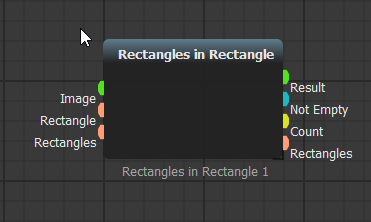
اذهب إلى شريط الكتل. ضمن **Detections/Shapes** افتح **Roi Processing** واسحب **Rectangles in Rectangle** إلى السيناريو.

![](https://1711505668-files.gitbook.io/~/files/v0/b/gitbook-x-prod.appspot.com/o/spaces%2FoktfDevppndJ75rImRz1%2Fuploads%2Fgit-blob-d290913ed6d759a8f9504623464514a84f484ab3%2Fbefore-rect-0.png?alt=media)

<details>

<summary>أضف البلوك باستخدام البحث بدلاً من ذلك</summary>

يمكنك إضافة الكتل بشكل أسرع عن طريق البحث. انقر نقراً مزدوجاً على مساحة فارغة واكتب **Rectangles**.
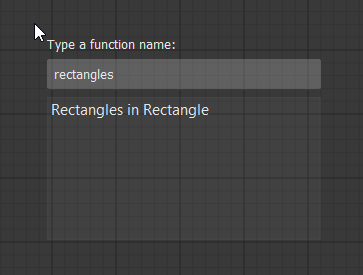
<figure><img src="https://1711505668-files.gitbook.io/~/files/v0/b/gitbook-x-prod.appspot.com/o/spaces%2FoktfDevppndJ75rImRz1%2Fuploads%2Fgit-blob-9e54427e4b856ac1ba90d2ea58e072e747f185a2%2Fsearch-func.png?alt=media" alt="Search for Rectangles in Rectangle" width="450"><figcaption><p>ابحث عن بلوك</p></figcaption></figure>

اضغط على Enter. سيتم إنشاء البلوك تحت مؤشر الفأرة لديك.

<figure><img src="https://1711505668-files.gitbook.io/~/files/v0/b/gitbook-x-prod.appspot.com/o/spaces%2FoktfDevppndJ75rImRz1%2Fuploads%2Fgit-blob-785d0d3a9d4aa682b6fc3b255d893873b155bfd9%2Frect-in-rect.png?alt=media" alt="Rectangles in Rectangle block" width="450"><figcaption><p>بلوك Rectangles in Rectangle</p></figcaption></figure>

</details>
{% endstep %}

{% step %}

### إضافة hole ROI

أضف بلوك آخر من نوع **Image ROI Select**. استخدمه لتحديد منطقة الحفرة.

أعد ترتيب واربط الكتل كما هو موضح في الأسفل.

![](https://1711505668-files.gitbook.io/~/files/v0/b/gitbook-x-prod.appspot.com/o/spaces%2FoktfDevppndJ75rImRz1%2Fuploads%2Fgit-blob-93d59ed9f9cbe76fd048c63b75cf321d69d06614%2Frect-in-rect-connected.png?alt=media)

يقوم **Rectangles in Rectangle** بالتحقق مما إذا كانت المستطيلات المكتشفة داخل منطقة المرجع المحددة أم لا.
{% endstep %}

{% step %}

### إضافة المخرجات المرئية

اربط **Led Output** و **Show Image** حتى تتمكن من رؤية ما إذا تم اكتشاف نتيجة التهديف.

![Led Output and Show Image connected](https://1711505668-files.gitbook.io/~/files/v0/b/gitbook-x-prod.appspot.com/o/spaces%2FoktfDevppndJ75rImRz1%2Fuploads%2Fgit-blob-25a56cf17872b64bf5944b2ae709451c739d6b7d%2Fled-show-image.png?alt=media)
{% endstep %}

{% step %}

### شغّل السيناريو النهائي

انقر <img src="https://1711505668-files.gitbook.io/~/files/v0/b/gitbook-x-prod.appspot.com/o/spaces%2FoktfDevppndJ75rImRz1%2Fuploads%2Fgit-blob-336c18484aa93d35401e4cf66bff9e99257fee93%2Fplay.png?alt=media" alt="run" data-size="line"> لتشغيل السيناريو.

![Finished golf scoring detector](https://1711505668-files.gitbook.io/~/files/v0/b/gitbook-x-prod.appspot.com/o/spaces%2FoktfDevppndJ75rImRz1%2Fuploads%2Fgit-blob-38aabfdd7a1cad558ca9a19951851bc6ccb7c91f%2Fproject-finished.webp?alt=media)
{% endstep %}
{% endstepper %}

لقد أنهيت أول سيناريو لك في AugeLab Studio: كاشف تسجيل أهداف الجولف.

تعلمت كيفية إضافة الكتل، توصيل المنافذ، تحديد ROIs، تشغيل سيناريو، تثبيت صورة مرجعية، اكتشاف كائن، وعرض النتيجة النهائية.