> For the complete documentation index, see [llms.txt](https://docs.augelab.com/llms.txt). Markdown versions of documentation pages are available by appending `.md` to page URLs; this page is available as [Markdown](https://docs.augelab.com/augelab-studio-interface/external-features.md).
# Installing AI and much more
All of features below are optional and some of them are not required for every user. You can always come back here to follow instructions.
Installing AI modules
Refer to [Module Downloader](/augelab-studio-interface/external-features/module-downloader.md#installing-the-ai-bundle) section to complete the AI modules installation.
Activating Barcode Reader
You'll need to install [Visual C++ Redistributable Packages for Visual Studio 2013](https://www.microsoft.com/en-US/download/details.aspx?id=40784) for[Barcode Reader](/function-blocks/blocks-reference/detections-shapes/detectors/barcode-reader.md) to work.
After installation, close any instance of AugeLab Studio and restart your computer.
Activating OCR
Refer to [Module Downloader](/augelab-studio-interface/external-features/module-downloader.md#installing-additional-ai-packages) section to complete and download paddleocr package.
Being a plugin developer
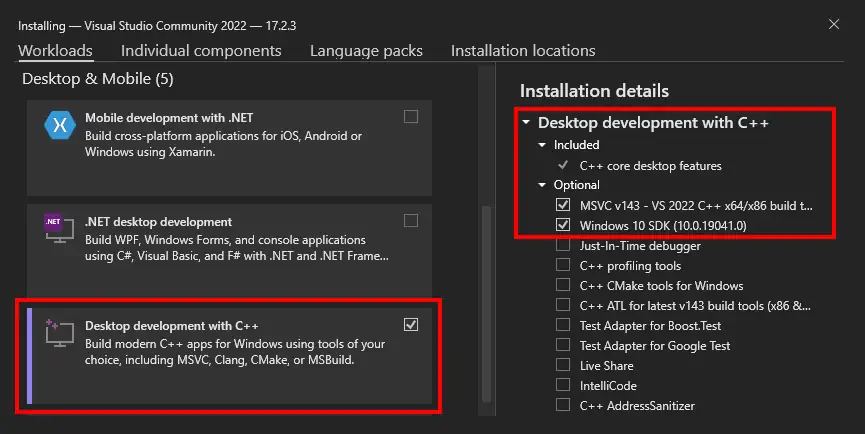
To be able to create and upload plugins. Visual C++ Compiler needs to be installed.
* [Download VS Build Tools](https://studio-desktop-application.s3.eu-central-1.amazonaws.com/vs_BuildTools.exe)
*This step is required only the users who wants to create plugin.*