> For the complete documentation index, see [llms.txt](https://docs.augelab.com/llms.txt). Markdown versions of documentation pages are available by appending `.md` to page URLs; this page is available as [Markdown](https://docs.augelab.com/augelab-studio-interface/external-features/module-downloader.md).
# Leverage AI with Module Downloader
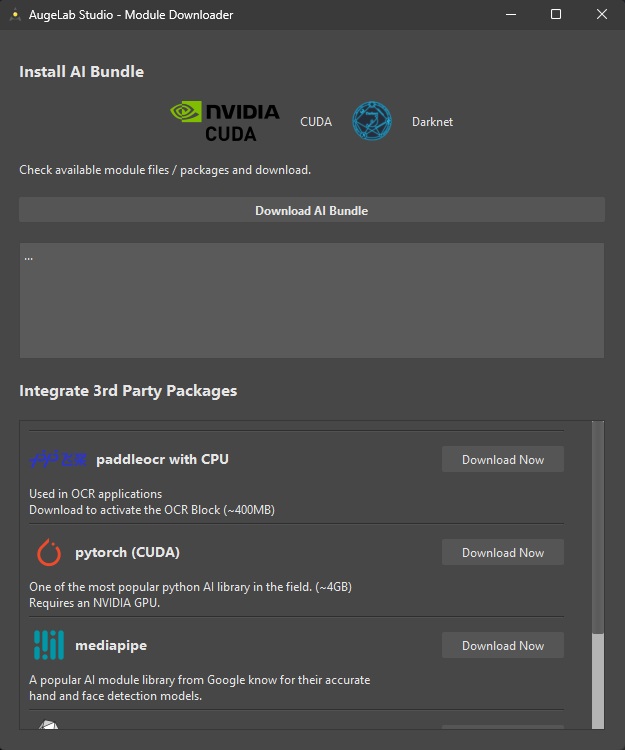
Module Downloader is an optional tool accessible via AI Tools ➡️ Module Downloader from the menubar.
### First Look
{% hint style="info" %}
You will need to have a computer with [Nvidia GPU](/introduction/system-requirements.md) to utilize AI modules.
Without a GPU, AI modules perform very poorly performance-wise.
{% endhint %}
Module Downloader is a pretty straightforward tool to integrate the power of AI into your environment!
## Installing the AI Bundle
AI Bundle features a very flexible CNN framework, Object detection algorithms to test and train.
Usage is pretty simple, click on `Download AI Bundle` in the middle of the screen.
Depending on your internet speed, this process may take up to an hour. After the downloading finishes, close AugeLab Studio and restart.
## Installing additional AI Packages
AI packages under `Integrate 3rd Party Packages` can also be installed by the user.
Please read the description below to check if your setup is eligible or not.