> For the complete documentation index, see [llms.txt](https://docs.augelab.com/llms.txt). Markdown versions of documentation pages are available by appending `.md` to page URLs; this page is available as [Markdown](https://docs.augelab.com/german/augelab-studio-oberflache/external-features/module-downloader.md).
# KI nutzen mit Module Downloader
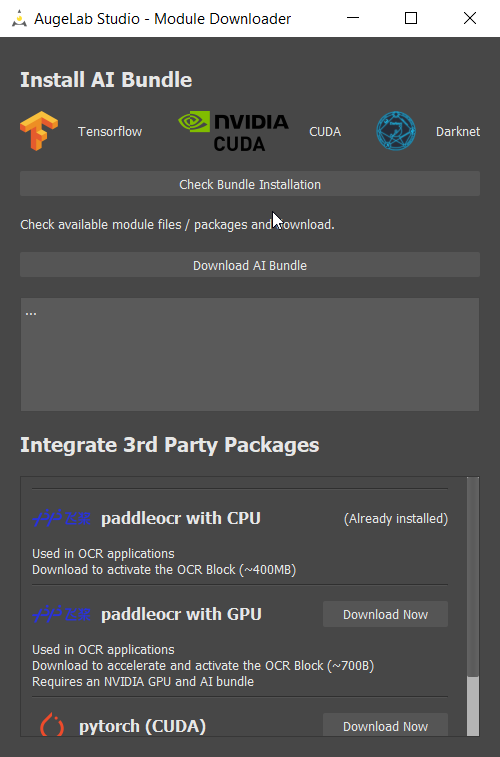
Module Downloader ist ein optionales Tool, das über AI Tools ➡️ Module Downloader in der Menüleiste zugänglich ist.
### Erster Blick
{% hint style="info" %}
Sie benötigen einen Computer mit einer [Nvidia GPU](/german/einfuhrung/system-requirements.md), um AI-Module nutzen zu können.
Ohne eine GPU funktionieren AI-Module leistungstechnisch sehr schlecht.
{% endhint %}
Module Downloader ist ein recht unkompliziertes Tool, um die Leistungsfähigkeit von AI in Ihre Umgebung zu integrieren!
## Installation des AI-Bundles
Das AI-Bundle bietet ein sehr flexibles CNN-Framework und Objekt-erkennungsalgorithmen zum Testen und Trainieren.
Die Nutzung ist ziemlich einfach:
1. Klicken Sie auf `Check Bundle Installation`
2. Einige Hinweise erscheinen auf dem Bildschirm, ob die Pakete vorhanden sind oder nicht.
3. Klicken Sie auf `Download AI Bundle` in der Mitte des Bildschirms.
Je nach Ihrer Internetgeschwindigkeit kann dieser Prozess bis zu einer Stunde dauern. Nachdem der Download abgeschlossen ist, schließen Sie AugeLab Studio und starten Sie es neu.
## Installation zusätzlicher AI-Pakete
AI-Pakete unter `Integrate 3rd Party Packages` können ebenfalls vom Benutzer installiert werden.
Bitte lesen Sie die Beschreibung unten, um zu überprüfen, ob Ihre Einrichtung berechtigt ist oder nicht.