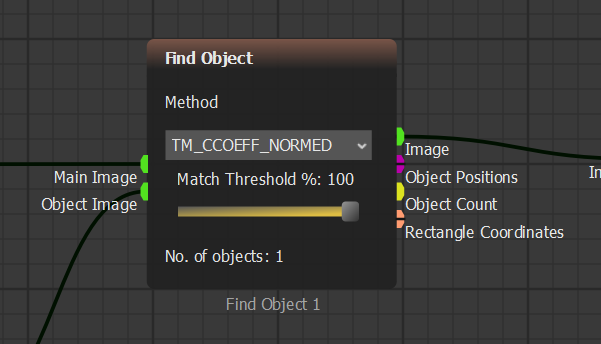
Find Object match threshold
 *Run Step*. Du solltest den erkannten Golfball in einem roten Rahmen im Block **Show Image** sehen.

{% endstep %}
{% step %}
### Kontinuierliche Erkennung testen
Klicke auf
*Run Step*. Du solltest den erkannten Golfball in einem roten Rahmen im Block **Show Image** sehen.

{% endstep %}
{% step %}
### Kontinuierliche Erkennung testen
Klicke auf  *Run* und beobachte die Erkennung für etwa 10 Sekunden.
Möglicherweise stellst du fest, dass die Erkennung instabil wird. Das passiert, weil sich die Referenz von **Image ROI Select** verändert, während sich der Ball bewegt — die Referenz kann so auf das Gras anstatt auf den Golfball zeigen.
{% endstep %}
{% step %}
### Image Memory hinzufügen
Um die Referenz stabil zu halten, füge **Image Memory** hinzu.
Gehe zur Blockleiste. Unter **Image Transformers** öffne **Analysis** und ziehe **Image Memory** in das Szenario.

{% endstep %}
{% step %}
### Logic Input hinzufügen
Unter **Input/Output** öffne **Data Inputs** und ziehe **Logic Input** in das Szenario.

{% endstep %}
{% step %}
### Überfüllte Blöcke neu anordnen
Bewege einen Block, indem du ihn anklickst und ziehst.

Bewege mehrere Blöcke, indem du eine Auswahl um sie ziehst und dann die ausgewählte Gruppe verschiebst.

{% endstep %}
{% step %}
### Image Memory verbinden
Verbinde die neuen Blöcke wie unten gezeigt.

**Image Memory** friert den Frame ein, den wir benötigen, sodass sich die Referenz während der Videoausführung nicht verändert.
{% endstep %}
{% step %}
### Referenzframe speichern
Führe das Szenario einen Schritt aus. Stelle dann **Logic Input** auf **True**, um das Bild in **Image Memory** zu speichern.

{% endstep %}
{% step %}
### Find Object anpassen
Gehe zum Block **Find Object** und setze **Match Threshold** auf `100%`.
*Run* und beobachte die Erkennung für etwa 10 Sekunden.
Möglicherweise stellst du fest, dass die Erkennung instabil wird. Das passiert, weil sich die Referenz von **Image ROI Select** verändert, während sich der Ball bewegt — die Referenz kann so auf das Gras anstatt auf den Golfball zeigen.
{% endstep %}
{% step %}
### Image Memory hinzufügen
Um die Referenz stabil zu halten, füge **Image Memory** hinzu.
Gehe zur Blockleiste. Unter **Image Transformers** öffne **Analysis** und ziehe **Image Memory** in das Szenario.

{% endstep %}
{% step %}
### Logic Input hinzufügen
Unter **Input/Output** öffne **Data Inputs** und ziehe **Logic Input** in das Szenario.

{% endstep %}
{% step %}
### Überfüllte Blöcke neu anordnen
Bewege einen Block, indem du ihn anklickst und ziehst.

Bewege mehrere Blöcke, indem du eine Auswahl um sie ziehst und dann die ausgewählte Gruppe verschiebst.

{% endstep %}
{% step %}
### Image Memory verbinden
Verbinde die neuen Blöcke wie unten gezeigt.

**Image Memory** friert den Frame ein, den wir benötigen, sodass sich die Referenz während der Videoausführung nicht verändert.
{% endstep %}
{% step %}
### Referenzframe speichern
Führe das Szenario einen Schritt aus. Stelle dann **Logic Input** auf **True**, um das Bild in **Image Memory** zu speichern.

{% endstep %}
{% step %}
### Find Object anpassen
Gehe zum Block **Find Object** und setze **Match Threshold** auf `100%`.
Find Object match threshold