# Key Features

AugeLab Studio is a no-code AI powered industrial vision platform. It lets you acquire images, process them, make decisions, train AI models, communicate with hardware, and deploy the result from one workspace.

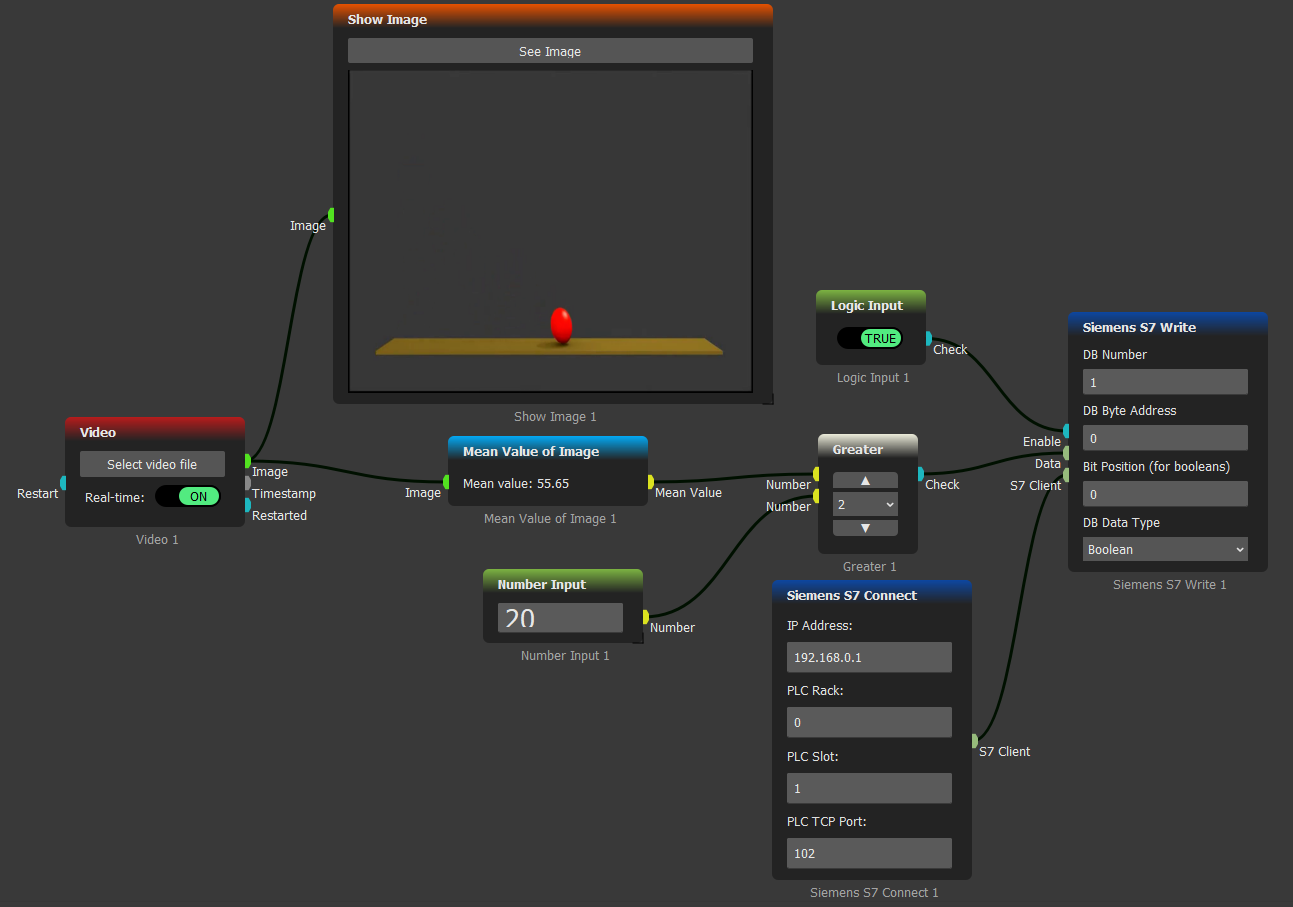
<figure><img src="/files/WFoZ4YmJMwKtTw7apQb9" alt="AugeLab Studio Workspace"><figcaption><p>AugeLab Studio visual workflow editor</p></figcaption></figure>

## Why No-Code?

Build scenarios by connecting function blocks instead of writing application code. A single workflow can include camera input, image processing, logic, math, hardware communication, and output actions.

Use local inference and training with your own datasets; object detection, tracking, pose estimation, segmentation, OCR, barcode reading, measurement, and anomaly-style inspection.

Connect industrial cameras and factory systems such as Basler, Hikvision, iTek, iRayple, GigE Vision, GenICam, RTSP, USB cameras, PLCs such as Siemens S7, OPC UA, Modbus, MQTT, REST API, Email, and SMS.

## Main Tools

<table data-view="cards"><thead><tr><th>Feature</th><th>What it helps you do</th><th data-card-target data-type="content-ref">Open</th></tr></thead><tbody><tr><td>AI Assistant</td><td>Ask for workflow ideas, block explanations, troubleshooting help, and custom logic.</td><td><a href="/pages/1FfSeZtsliZSVQ0ktf4u">/pages/1FfSeZtsliZSVQ0ktf4u</a></td></tr><tr><td>Annotation</td><td>Collect images, label objects, use assisted annotation, and prepare datasets.</td><td><a href="/pages/Lagyme7wyJdJObK7S6us">/pages/Lagyme7wyJdJObK7S6us</a></td></tr><tr><td>Model Training</td><td>Train object detection models with your own dataset inside AugeLab Studio.</td><td><a href="/pages/yo1aRPIAZ1Dbyk2sayls">/pages/yo1aRPIAZ1Dbyk2sayls</a></td></tr><tr><td>Plugin Designer</td><td>Create reusable custom blocks when the built-in block library is not enough.</td><td><a href="/pages/Z3q1NWC328X3luJRIayf">/pages/Z3q1NWC328X3luJRIayf</a></td></tr><tr><td>Headless Studio</td><td>Run saved scenarios from Python, CLI, Docker, Linux services, or edge devices.</td><td><a href="/pages/wbOE6H8ADaP0myWjScbs">/pages/wbOE6H8ADaP0myWjScbs</a></td></tr><tr><td>Widget to Socket</td><td>Turn node settings into input sockets so other blocks can control parameters.</td><td><a href="/pages/WHw7LCjzUKB7Hw736fhf">/pages/WHw7LCjzUKB7Hw736fhf</a></td></tr><tr><td>Python Packages</td><td>Install extra Python packages and use them in your custom workflows.</td><td><a href="/pages/3VMfMbvroWQX2fRmRFsp">/pages/3VMfMbvroWQX2fRmRFsp</a></td></tr><tr><td>Community Sharing</td><td>Package and share solutions so others can reuse your work.</td><td><a href="/pages/lsJFbjdL2eDEMwISBDLd">/pages/lsJFbjdL2eDEMwISBDLd</a></td></tr></tbody></table>


---

# Agent Instructions: Querying This Documentation

If you need additional information that is not directly available in this page, you can query the documentation dynamically by asking a question.

Perform an HTTP GET request on the current page URL with the `ask` query parameter:

```
GET https://docs.augelab.com/introduction/key-features.md?ask=<question>
```

The question should be specific, self-contained, and written in natural language.
The response will contain a direct answer to the question and relevant excerpts and sources from the documentation.

Use this mechanism when the answer is not explicitly present in the current page, you need clarification or additional context, or you want to retrieve related documentation sections.
