> For the complete documentation index, see [llms.txt](https://docs.augelab.com/llms.txt). Markdown versions of documentation pages are available by appending `.md` to page URLs; this page is available as [Markdown](https://docs.augelab.com/turkish/augelab-studio-arayuzu/external-features.md).
# AI Kurulumu ve daha fazlası
Aşağıdaki tüm özellikler isteğe bağlıdır ve bazıları her kullanıcı için gerekli değildir. Talimatları takip etmek için istediğiniz zaman buraya geri dönebilirsiniz.
AI modüllerinin kurulumu
AI modülü kurulumu için [Module Downloader](/turkish/augelab-studio-arayuzu/external-features/module-downloader.md#installing-the-ai-bundle) bölümüne bakın.
Barkod Okuyucunun Aktifleştirilmesi
[Barcode Reader](/turkish/fonksiyon-bloklari/blocks-reference/detections-shapes/detectors/barcode-reader.md) çalışması için [Visual C++ Redistributable Packages for Visual Studio 2013](https://www.microsoft.com/en-US/download/details.aspx?id=40784) kurulumunu yapmanız gerekecek.
Kurulumdan sonra, AugeLab Studio'nun herhangi bir örneğini kapatın ve bilgisayarınızı yeniden başlatın.
OCR'nin Aktifleştirilmesi
Paddleocr paketini tamamlamak ve indirmek için [Module Downloader](https://github.com/AugelabTech/AugeLab-Studio-Gitbook-Docs/blob/main/turkce/user-interface/user-interface/integrate-gpu-with-module-downloader.md#installing-additional-ai-packages) bölümüne bakın.
Eklenti Geliştiricisi Olmak
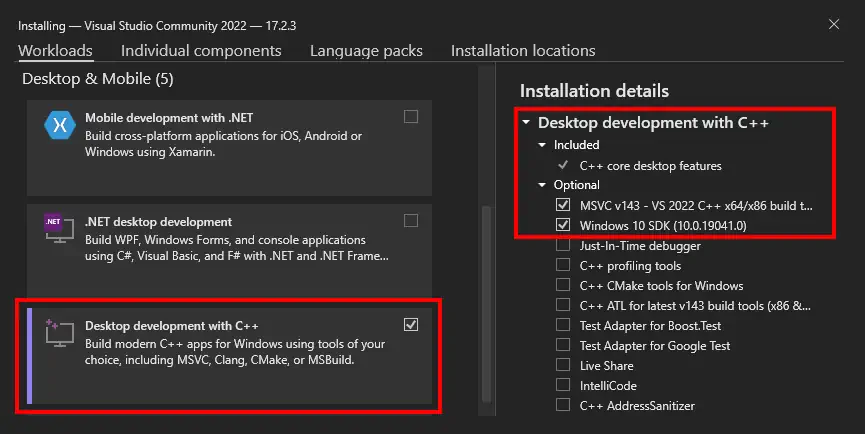
Eklenti oluşturup yükleyebilmek için Visual C++ Compiler'ın kurulu olması gerekmektedir.
* [VS Build Tools İndir](https://studio-desktop-application.s3.eu-central-1.amazonaws.com/vs_BuildTools.exe)
*Bu adım, yalnızca eklenti oluşturmak isteyen kullanıcılar için gereklidir.*