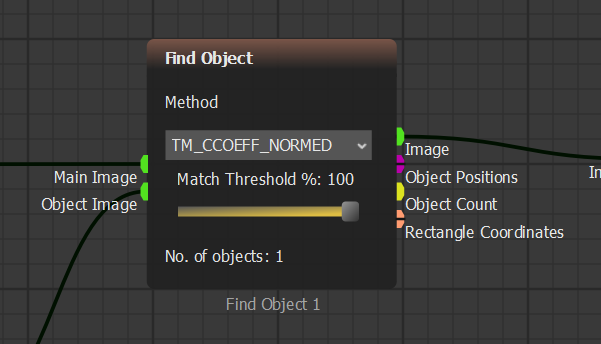
Find Object match threshold
 *Run Step*. \*\*Show Image\*\* içinde tespit edilen golf topunu kırmızı bir kutu içinde görmelisiniz.

{% endstep %}
{% step %}
### Sürekli Tespiti Test Edin
*Run Step*. \*\*Show Image\*\* içinde tespit edilen golf topunu kırmızı bir kutu içinde görmelisiniz.

{% endstep %}
{% step %}
### Sürekli Tespiti Test Edin
 *Run* tuşuna basın ve tespiti yaklaşık 10 saniye boyunca izleyin.
Tespitin kararsızlaştığını fark edebilirsiniz. Bunun nedeni, **Image ROI Select** referansının top hareket ettikçe değişmesi ve referansımızın çime dönüşebilmesidir.
{% endstep %}
{% step %}
### Image Memory Ekle
Referansı sabit tutmak için **Image Memory** ekleyin.
Bloklar çubuğuna gidin. **Image Transformers** altında **Analysis**’ı açın ve **Image Memory** bloğunu senaryoya sürükleyin.

{% endstep %}
{% step %}
### Logic Input Ekle
**Input/Output** altında **Data Inputs**’ı açın ve **Logic Input** bloğunu senaryoya sürükleyin.

{% endstep %}
{% step %}
### Kalabalık Blokları Yeniden Düzenleyin
Bir bloğu tıklayıp sürükleyerek hareket ettirin.

Birden fazla bloğu seçip sürükleyerek grubu taşıyın.

{% endstep %}
{% step %}
### Image Memory'yi Bağlayın
Yeni blokları aşağıda gösterildiği gibi bağlayın.

**Image Memory**, ihtiyaç duyduğumuz kareyi dondurur, böylece video çalışırken referans değişmez.
{% endstep %}
{% step %}
### Referans karesini kaydedin
Senaryoyu bir adım çalıştırın. Ardından **Logic Input**'u **True** yaparak görüntüyü **Image Memory** içinde kaydedin.

{% endstep %}
{% step %}
### Find Object'u Ayarlayın
**Find Object** bloğuna gidin ve **Match Threshold** değerini `100%` olarak ayarlayın.
*Run* tuşuna basın ve tespiti yaklaşık 10 saniye boyunca izleyin.
Tespitin kararsızlaştığını fark edebilirsiniz. Bunun nedeni, **Image ROI Select** referansının top hareket ettikçe değişmesi ve referansımızın çime dönüşebilmesidir.
{% endstep %}
{% step %}
### Image Memory Ekle
Referansı sabit tutmak için **Image Memory** ekleyin.
Bloklar çubuğuna gidin. **Image Transformers** altında **Analysis**’ı açın ve **Image Memory** bloğunu senaryoya sürükleyin.

{% endstep %}
{% step %}
### Logic Input Ekle
**Input/Output** altında **Data Inputs**’ı açın ve **Logic Input** bloğunu senaryoya sürükleyin.

{% endstep %}
{% step %}
### Kalabalık Blokları Yeniden Düzenleyin
Bir bloğu tıklayıp sürükleyerek hareket ettirin.

Birden fazla bloğu seçip sürükleyerek grubu taşıyın.

{% endstep %}
{% step %}
### Image Memory'yi Bağlayın
Yeni blokları aşağıda gösterildiği gibi bağlayın.

**Image Memory**, ihtiyaç duyduğumuz kareyi dondurur, böylece video çalışırken referans değişmez.
{% endstep %}
{% step %}
### Referans karesini kaydedin
Senaryoyu bir adım çalıştırın. Ardından **Logic Input**'u **True** yaparak görüntüyü **Image Memory** içinde kaydedin.

{% endstep %}
{% step %}
### Find Object'u Ayarlayın
**Find Object** bloğuna gidin ve **Match Threshold** değerini `100%` olarak ayarlayın.
Find Object match threshold