# Tamamlama

Bu bölümde, tespit edilen golf topunun deliğin içinde olup olmadığını kontrol edecek ve ardından nihai sonucu göstereceksiniz.

{% stepper %}
{% step %}

### Rectangles in Rectangle bloğunu ekleyin

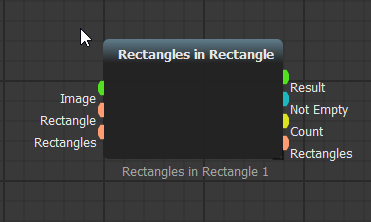
Bloklar çubuğuna gidin. **Detections/Shapes** altında **Roi Processing**i açın ve **Rectangles in Rectangle** bloğunu senaryoya sürükleyip bırakın.

![](/files/0mnGxfcjzCD0OOP1BO90)

<details>

<summary>Blok eklemeyi arama ile yapın (alternatif)</summary>

Blokları arama ile daha hızlı ekleyebilirsiniz. Boş bir alana çift tıklayın ve **Rectangles** yazın.
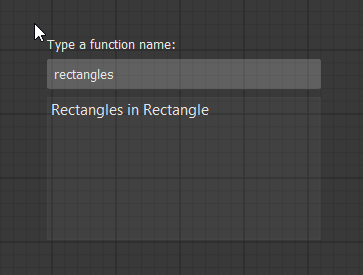
<figure><img src="/files/DLyRairUx2fVB8iH9llB" alt="Search for Rectangles in Rectangle" width="450"><figcaption><p>Bir blok arayın</p></figcaption></figure>

Enter tuşuna basın. Blok imlecinizin altında oluşturulacaktır.

<figure><img src="/files/1jykKBX4JTKUtxhfaOB9" alt="Rectangles in Rectangle block" width="450"><figcaption><p>Rectangles in Rectangle bloğu</p></figcaption></figure>

</details>
{% endstep %}

{% step %}

### Delik ROI'sini ekleyin

Bir tane daha **Image ROI Select** bloğu ekleyin. Bunu delik alanını seçmek için kullanın.

Blokları yeniden düzenleyin ve aşağıda gösterildiği gibi bağlayın.

![](/files/1QjaaVNX0lY0oPzFiR56)

**Rectangles in Rectangle**, tespit edilen dikdörtgenlerin seçili referans alanın içinde olup olmadığını kontrol eder.
{% endstep %}

{% step %}

### Görsel çıktılar ekleyin

Bir skor tespit edilip edilmediğini görebilmek için **Led Output** ve **Show Image** bloklarını bağlayın.

![Led Output and Show Image connected](/files/ZPXdk5cq8HeaBoxBSbxh)
{% endstep %}

{% step %}

### Tamamlanan senaryoyu çalıştırın

Senaryoyu çalıştırmak için <img src="/files/6QqiFU7ccvJEtId6TUkp" alt="run" data-size="line"> üzerine tıklayın.

![Finished golf scoring detector](/files/n0Hg1bhGNEy3dPQ9un0h)
{% endstep %}
{% endstepper %}

İlk AugeLab Studio senaryonuzu tamamladınız: bir golf puanlama detektörü.

Blok eklemeyi, soketleri bağlamayı, ROI seçmeyi, bir senaryoyu çalıştırmayı, referans görüntüyü stabilize etmeyi, bir nesneyi tespit etmeyi ve nihai sonucu göstermeyi öğrendiniz.


---

# Agent Instructions: Querying This Documentation

If you need additional information that is not directly available in this page, you can query the documentation dynamically by asking a question.

Perform an HTTP GET request on the current page URL with the `ask` query parameter:

```
GET https://docs.augelab.com/turkish/baslarken/your-very-first-project/finishing-up.md?ask=<question>
```

The question should be specific, self-contained, and written in natural language.
The response will contain a direct answer to the question and relevant excerpts and sources from the documentation.

Use this mechanism when the answer is not explicitly present in the current page, you need clarification or additional context, or you want to retrieve related documentation sections.