> For the complete documentation index, see [llms.txt](https://docs.augelab.com/llms.txt). Markdown versions of documentation pages are available by appending `.md` to page URLs; this page is available as [Markdown](https://docs.augelab.com/turkish/ornek-projeler/object-detection.md).
# Nesne Tespiti
{% hint style="info" %}
Bu eğitimi tamamlamak için AI modüllerini yüklemeniz ve bir GPU'ya sahip bir bilgisayarınız olması gerekecektir. Daha fazla talimat için lütfen [kurulum kılavuzuna](/turkish/baslarken/installation-and-licensing.md#follow-the-steps-below-to-use-ai-modules) başvurun.
{% endhint %}
Nesne tespiti, hem bilgisayarla görme hem de kamu medyasında çok popüler bir konu olmuştur. Bu uygulama, birçok farklı sektörde yaygın olarak uygulanmakta olup, daha pek çok potansiyel uygulama alanı bulunmaktadır.
Bu eğitimde, bir otobüste basit bir çarpışma uyarı sistemi nasıl oluşturulacağını göstereceğiz.
### Görüntü
Her senaryo için olduğu gibi, bir otobüsün ön tarafına ait görüntülere ihtiyacımız var. Hemen gidip dash-cam videosunu indirin:
{% file src="/files/G88Zi6gerTPJ07eRUden" %}
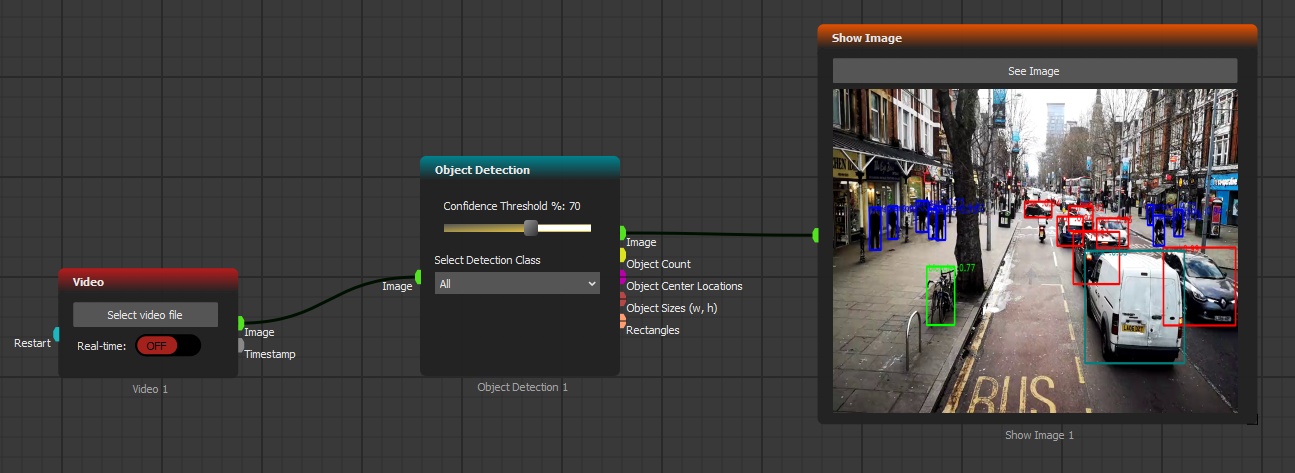
[Video](https://github.com/AugelabTech/AugeLab-Studio-Gitbook-Docs/blob/main/turkce/function-blocks-inputs/video.md) bloğunu kullanarak dash cam sonuçlarını okuyacağız. Ayrıca, [Nesne Tespiti](/turkish/fonksiyon-bloklari/blocks-reference/ai-blocks/object-detection.md) bloğuna ihtiyaç duyarız; böylece karşılaşabileceğimiz herhangi bir insan, bisiklet veya aracı tespit edebiliriz.
Aşağıdaki senaryoyu oluşturun:
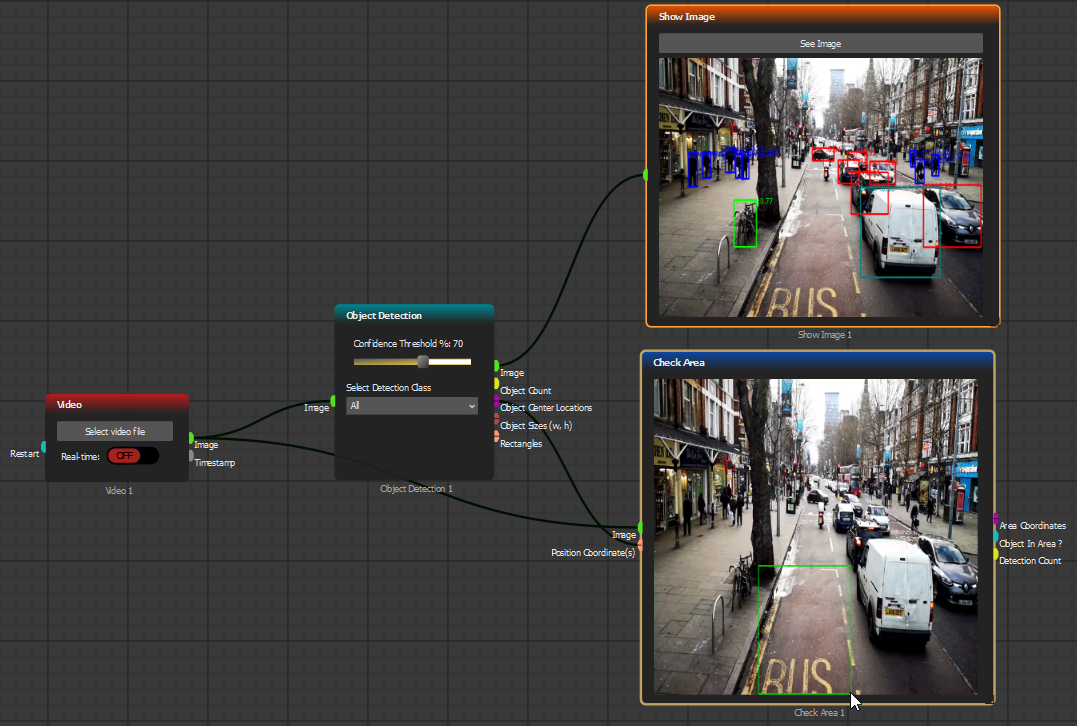
Çarpışma tespit sistemimizin, yalnızca otobüsümüzün önünde bir nesne olup olmadığını kontrol etmesi gerektiğinden, [Check Area](/turkish/fonksiyon-bloklari/blocks-reference/detections-shapes/roi-processing/check-area.md) bloğunu kullanmamız ve çarpışma uyarı alanını seçmemiz gerekecek:
[Check Area](/turkish/fonksiyon-bloklari/blocks-reference/detections-shapes/roi-processing/check-area.md) bloğu, referans sınırlayıcı kutu alanında herhangi bir nesne olup olmadığını değerlendirmemizi sağlar. Çarpışma sistemimizin beklendiği gibi çalışıp çalışmadığını göstermek için [Not](/turkish/fonksiyon-bloklari/blocks-reference/data-logic/logic/not.md) ve [Led Output](/turkish/fonksiyon-bloklari/blocks-reference/input-output/outputs-exports/led-output.md) bloklarını kullanın: