> For the complete documentation index, see [llms.txt](https://docs.augelab.com/llms.txt). Markdown versions of documentation pages are available by appending `.md` to page URLs; this page is available as [Markdown](https://docs.augelab.com/key-features/instal-custom-packages-with-package-window.md).
# Instal Python Packages
Install dependencies into the Studio Python environment.
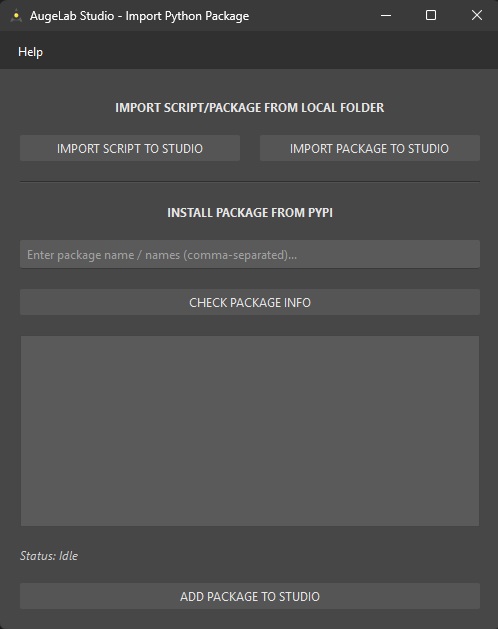
The **Import Package Window** lets you add Python dependencies to the same environment that runs:
* Designer Window custom blocks (`custom_blocks/*.py`)
* other user scripts that execute inside AugeLab Studio
## First Look
Import Package Window
## Open the Window
* Menu: `Tools > Import Package Window`
## Quick Cheat Sheet
| You want to… | Use | Notes |
| ------------------------------------------------- | ----------------------------------------------------- | ------------------------------------------------------------------ |
| Copy a single `.py` file into Studio | `IMPORT SCRIPT TO STUDIO` | Good for small helpers (e.g., `utils.py`). |
| Copy an entire local folder (package) into Studio | `IMPORT PACKAGE TO STUDIO` | Choose a folder that contains Python modules. |
| Install from PyPI | `INSTALL PACKAGE FROM PYPI` + `ADD PACKAGE TO STUDIO` | Internet required. You can enter multiple names (comma-separated). |
| Validate package name/version info | `CHECK PACKAGE INFO` | Prints metadata into the log panel. |
| Open the built-in help text | `Help` (top menu in the window) | Opens “Import Python Package Manual”. |
{% hint style="warning" %}
Installing community packages can reduce portability. If your scenario needs to run on another machine, install the same packages there too (same Python version + platform).
{% endhint %}
Install from PyPI
1. Open `Tools > Import Package Window`.
2. In **INSTALL PACKAGE FROM PYPI**, type one or more package names (comma-separated).
3. Click **CHECK PACKAGE INFO** to confirm the package exists and to review metadata.
4. Click **ADD PACKAGE TO STUDIO** and watch the log for progress/errors.
{% hint style="info" %}
Packages are installed into the Studio “pkgs” directory (the same environment used by Designer custom blocks).
{% endhint %}
Import a local script (.py)
1. Click **IMPORT SCRIPT TO STUDIO**.
2. Choose a `.py` file.
3. Confirm the success message.
Use this when you want to import a helper module and then do `import my_helper` from your custom block.
Import a local package (folder)
1. Click **IMPORT PACKAGE TO STUDIO**.
2. Choose a folder that contains your Python package/modules.
3. Confirm the success message (or read the error dialog).
{% hint style="info" %}
If you update the package later, re-import it (or remove the old copy first, then import again).
{% endhint %}
Troubleshooting
| Problem | What to try |
| -------------------------------- | ------------------------------------------------------------------------------- |
| “Package not found” | Double-check the name on `pypi.org` and retry **CHECK PACKAGE INFO**. |
| Install fails mid-way | Check your internet connection and read the log output. |
| A custom block crashes on import | Wrap optional imports in `try/except ImportError` and handle `None` in `run()`. |