> For the complete documentation index, see [llms.txt](https://docs.augelab.com/llms.txt). Markdown versions of documentation pages are available by appending `.md` to page URLs; this page is available as [Markdown](https://docs.augelab.com/key-features/create-plugins-with-designer-window/components.md).
# Components
Components are interactive widgets that let users configure parameters (inputs) or view results inside your custom block.
{% hint style="info" %}
Components are constructed by keyword arguments.
{% endhint %}
#### Generic Arguments
Generic arguments apply to all custom components. You can provide them as keyword arguments to constructors.
Instead of repeating them under every component, here is a small “pyi-style” reference:
```python
# Common keyword arguments (supported by all components)
class _CommonComponentKwargs:
def __init__(
self,
*,
tool_tip: str = "",
enabled: bool = True,
hidden: bool = False,
fixed_width: int = 0,
fixed_height: int = 0,
minimum_width: int = 0,
minimum_height: int = 0,
maximum_width: int = 0,
maximum_height: int = 0,
serializable: bool = True,
stylesheet: str = "",
font_size: int = -1,
font_bold: bool = False,
alignment: str = "AlignLeft",
**kwargs,
) -> None: ...
```
Notes:
* `tool_tip` controls the tooltip shown when hovering the component.
* `fixed_width` / `fixed_height` are pixels. Use `0` for “auto”.
* Some components override defaults (for example `DropDown` is non-serializable; `Image` is non-serializable by default).
### Text Input
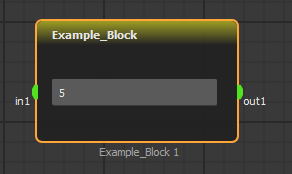
Allows users to input text/number through a single line.
 ```python
# pyi-style reference
class TextInput:
def __init__(
self,
*,
text: str = "",
place_holder: str = "",
check_type: type = str,
password: bool = False,
tool_tip: str = "",
**kwargs,
) -> None: ...
@property
def value(self) -> str: ...
@property
def text(self) -> str: ... # same as .value
def toInt(self) -> int: ...
def toFloat(self) -> float: ...
```
Notes:
* Use `check_type=int` or `check_type=float` to restrict what the user can type.
* Use `.toInt()` / `.toFloat()` when you want conversion errors to surface with a clear exception (no silent fallback).
**Example:**
```python
class Example_Block(Block):
...
def init(self):
...
self.param["text1"] = TextInput(
text="5",
place_holder="Enter an integer",
check_type=int,
tool_tip="Defines constant",
)
def run(self):
...
constant: int = self.param["text1"].toInt()
...
```
### Drop Down List
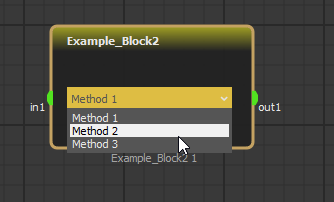
Drop down lists allows users to choose an option from a provided list of texts.
```python
# pyi-style reference
class TextInput:
def __init__(
self,
*,
text: str = "",
place_holder: str = "",
check_type: type = str,
password: bool = False,
tool_tip: str = "",
**kwargs,
) -> None: ...
@property
def value(self) -> str: ...
@property
def text(self) -> str: ... # same as .value
def toInt(self) -> int: ...
def toFloat(self) -> float: ...
```
Notes:
* Use `check_type=int` or `check_type=float` to restrict what the user can type.
* Use `.toInt()` / `.toFloat()` when you want conversion errors to surface with a clear exception (no silent fallback).
**Example:**
```python
class Example_Block(Block):
...
def init(self):
...
self.param["text1"] = TextInput(
text="5",
place_holder="Enter an integer",
check_type=int,
tool_tip="Defines constant",
)
def run(self):
...
constant: int = self.param["text1"].toInt()
...
```
### Drop Down List
Drop down lists allows users to choose an option from a provided list of texts.
 ```python
# pyi-style reference
class DropDown:
serializable: bool = False
def __init__(
self,
*,
items: list[str] | dict[str, object] = ["item1", "item2", "item3"],
selected_index: int = 0,
tool_tip: str = "",
**kwargs,
) -> None: ...
@property
def selected_item(self) -> str: ...
@property
def selected_index(self) -> int: ...
```
Notes:
* If you pass `items` as a `dict[str, object]`, you can access the mapped value via `.getCurrentMatch()`.
{% hint style="warning" %}
`DropDown` is currently marked as non-serializable. If you want the selection to persist in saved scenarios, store `selected_index` yourself (for example with `register_ser_value()` or `serialize_node()`).
{% endhint %}
Example:
```python
class Example_Block(Block):
...
def init(self):
...
self.param['drop_down'] = DropDown(items=['Method 1', 'Method 2', 'Method 3'],
tool_tip='Choose Method')
def run(self):
...
method_index: int = self.param['drop_down'].selected_index
method_name: str = self.param['drop_down'].selected_item
if method_index == 0:
...
```
### Label
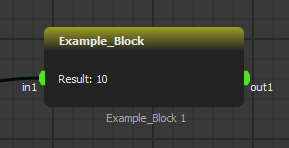
Labels are simple text based components to statically or dynamically show text on your custom block.
```python
# pyi-style reference
class DropDown:
serializable: bool = False
def __init__(
self,
*,
items: list[str] | dict[str, object] = ["item1", "item2", "item3"],
selected_index: int = 0,
tool_tip: str = "",
**kwargs,
) -> None: ...
@property
def selected_item(self) -> str: ...
@property
def selected_index(self) -> int: ...
```
Notes:
* If you pass `items` as a `dict[str, object]`, you can access the mapped value via `.getCurrentMatch()`.
{% hint style="warning" %}
`DropDown` is currently marked as non-serializable. If you want the selection to persist in saved scenarios, store `selected_index` yourself (for example with `register_ser_value()` or `serialize_node()`).
{% endhint %}
Example:
```python
class Example_Block(Block):
...
def init(self):
...
self.param['drop_down'] = DropDown(items=['Method 1', 'Method 2', 'Method 3'],
tool_tip='Choose Method')
def run(self):
...
method_index: int = self.param['drop_down'].selected_index
method_name: str = self.param['drop_down'].selected_item
if method_index == 0:
...
```
### Label
Labels are simple text based components to statically or dynamically show text on your custom block.
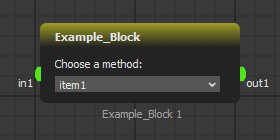
 They are also used to provide information about interactable components:
 ```python
# pyi-style reference
class Label:
def __init__(self, *, text: str = "", tool_tip: str = "", **kwargs) -> None: ...
def set_text(self, text: str) -> None: ...
```
Example:
```python
class Example_Block(Block):
...
def init(self):
...
self.param['label'] = Label(text='Result is: Not Set',
tool_tip='Shows mean value')
def run(self):
...
self.param['label'].set_text(f'Result is: {n}')
...
```
### Slider
Restricts user input to range of numbers.
```python
# pyi-style reference
class Label:
def __init__(self, *, text: str = "", tool_tip: str = "", **kwargs) -> None: ...
def set_text(self, text: str) -> None: ...
```
Example:
```python
class Example_Block(Block):
...
def init(self):
...
self.param['label'] = Label(text='Result is: Not Set',
tool_tip='Shows mean value')
def run(self):
...
self.param['label'].set_text(f'Result is: {n}')
...
```
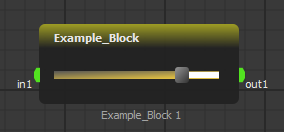
### Slider
Restricts user input to range of numbers.
 ```python
# pyi-style reference
class Slider:
def __init__(
self,
*,
min: int = 0,
max: int = 100,
val: int = 50,
tool_tip: str = "",
**kwargs,
) -> None: ...
@property
def value(self) -> float | int: ...
```
Example:
```python
class Example_Block(Block):
...
def init(self):
...
self.param['slider'] = Slider(min=-5, max=5, val=3)
def run(self):
...
threshold: int = self.param['slider'].value
...
```
### Slider Labeled
Same as [Slider](#slider) but adds a label that automatically shows which value is shown in component.
```python
# pyi-style reference
class Slider:
def __init__(
self,
*,
min: int = 0,
max: int = 100,
val: int = 50,
tool_tip: str = "",
**kwargs,
) -> None: ...
@property
def value(self) -> float | int: ...
```
Example:
```python
class Example_Block(Block):
...
def init(self):
...
self.param['slider'] = Slider(min=-5, max=5, val=3)
def run(self):
...
threshold: int = self.param['slider'].value
...
```
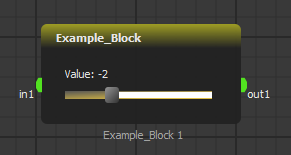
### Slider Labeled
Same as [Slider](#slider) but adds a label that automatically shows which value is shown in component.
 ```python
# pyi-style reference
class SliderLabeled:
def __init__(
self,
*,
min: int = 0,
max: int = 100,
val: int = 50,
label: str = "Value",
multiplier: float | int = 1,
add: float | int = 0,
tool_tip: str = "",
**kwargs,
) -> None: ...
@property
def value(self) -> float | int: ...
@property
def modifiedValue(self) -> float | int: ...
```
Example:
```python
class Example_Block(Block):
...
def init(self):
...
self.param['threshold_odd'] = SliderLabeled(min= -5, max= 5, val= 3, label="Value", multiplier = 2, add = -1)
def run(self):
...
threshold_odd: int = self.param['threshold_odd'].modifiedValue
...
```
### CheckBox
Allows logic state input.
```python
# pyi-style reference
class SliderLabeled:
def __init__(
self,
*,
min: int = 0,
max: int = 100,
val: int = 50,
label: str = "Value",
multiplier: float | int = 1,
add: float | int = 0,
tool_tip: str = "",
**kwargs,
) -> None: ...
@property
def value(self) -> float | int: ...
@property
def modifiedValue(self) -> float | int: ...
```
Example:
```python
class Example_Block(Block):
...
def init(self):
...
self.param['threshold_odd'] = SliderLabeled(min= -5, max= 5, val= 3, label="Value", multiplier = 2, add = -1)
def run(self):
...
threshold_odd: int = self.param['threshold_odd'].modifiedValue
...
```
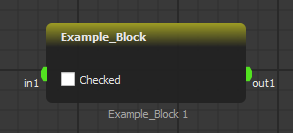
### CheckBox
Allows logic state input.
 ```python
# pyi-style reference
class CheckBox:
def __init__(
self,
*,
text: str = "",
init_state: bool = False,
tool_tip: str = "",
**kwargs,
) -> None: ...
@property
def is_checked(self) -> bool: ...
```
Example:
```python
class Example_Block(Block):
...
def init(self):
...
self.param['gray_mode'] = CheckBox(text=': Gray Mode')
def run(self):
...
flag_gray: bool = self.param['gray_mode'].is_checked
...
```
### Button
Triggers an event in your script on mouse click. This component is also very useful for resource management for custom blocks in your scenario.
```python
# pyi-style reference
class CheckBox:
def __init__(
self,
*,
text: str = "",
init_state: bool = False,
tool_tip: str = "",
**kwargs,
) -> None: ...
@property
def is_checked(self) -> bool: ...
```
Example:
```python
class Example_Block(Block):
...
def init(self):
...
self.param['gray_mode'] = CheckBox(text=': Gray Mode')
def run(self):
...
flag_gray: bool = self.param['gray_mode'].is_checked
...
```
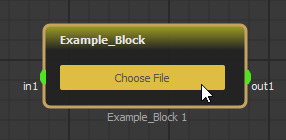
### Button
Triggers an event in your script on mouse click. This component is also very useful for resource management for custom blocks in your scenario.
 ```python
# pyi-style reference
from collections.abc import Callable
class Button:
def __init__(self, *, text: str = "", tool_tip: str = "", **kwargs) -> None: ...
def set_clicked_callback(self, callback: Callable[[], None]) -> None: ...
```
{% hint style="info" %}
Use `set_clicked_callback(...)` inside `init()`.
{% endhint %}
Example:
```python
...
class Example_Block(Block):
...
file_path: str = ''
def init(self):
...
self.param['Choose File'] = Button(text= 'Choose File')
self.param['Choose File'].set_clicked_callback(self.load_image)
def load_image(self):
path = QAFileDialog.getOpenFileName(caption='Load Image',
directory='C:/Images',
filter='Image Files (*.png *.jpg *.bmp)')
self.file_path = self.register_resource('image-path', path)
def run(self):
image_path = self.get_resource('image-path')
```
Example above utilizes callbacks using [`register_resource`](/key-features/create-plugins-with-designer-window/coding-reference.md#blockregister_resourcename-str-path-str-str) and [`get_resource`](/key-features/create-plugins-with-designer-window/coding-reference.md#blockget_resourcename-str-str).
### Image
```python
# pyi-style reference
from collections.abc import Callable
class Button:
def __init__(self, *, text: str = "", tool_tip: str = "", **kwargs) -> None: ...
def set_clicked_callback(self, callback: Callable[[], None]) -> None: ...
```
{% hint style="info" %}
Use `set_clicked_callback(...)` inside `init()`.
{% endhint %}
Example:
```python
...
class Example_Block(Block):
...
file_path: str = ''
def init(self):
...
self.param['Choose File'] = Button(text= 'Choose File')
self.param['Choose File'].set_clicked_callback(self.load_image)
def load_image(self):
path = QAFileDialog.getOpenFileName(caption='Load Image',
directory='C:/Images',
filter='Image Files (*.png *.jpg *.bmp)')
self.file_path = self.register_resource('image-path', path)
def run(self):
image_path = self.get_resource('image-path')
```
Example above utilizes callbacks using [`register_resource`](/key-features/create-plugins-with-designer-window/coding-reference.md#blockregister_resourcename-str-path-str-str) and [`get_resource`](/key-features/create-plugins-with-designer-window/coding-reference.md#blockget_resourcename-str-str).
### Image
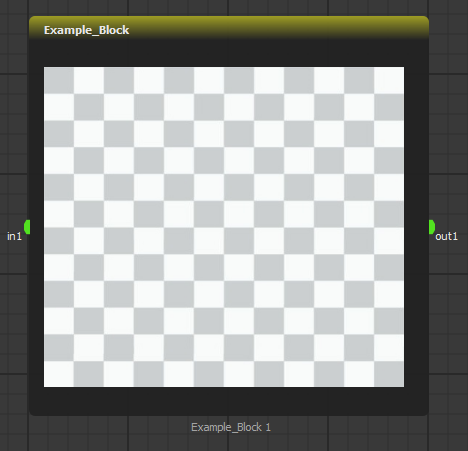 ```python
# pyi-style reference
import numpy as np
import numpy.typing as npt
class Image:
def __init__(
self,
*,
fixed_width: int = 80,
fixed_height: int = 80,
tool_tip: str = "",
serializable: bool = False,
**kwargs,
) -> None: ...
def update(self, img: npt.NDArray[np.uint8]) -> None: ...
```
Example:
```python
...
class Example_Block(Block):
def init(self):
...
self.param['Result'] = Image(
fixed_width=self.width - 40,
fixed_height=self.height - 80,
)
def run(self):
...
self.param['Result'].update(np.zeros((60, 60, 3), dtype=np.uint8))
...
```
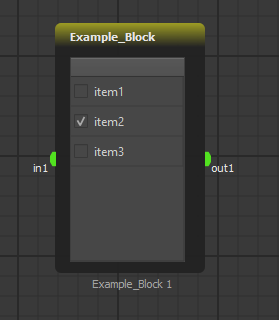
### Table
Allows multiple items/modes to be selected at the same time.
```python
# pyi-style reference
import numpy as np
import numpy.typing as npt
class Image:
def __init__(
self,
*,
fixed_width: int = 80,
fixed_height: int = 80,
tool_tip: str = "",
serializable: bool = False,
**kwargs,
) -> None: ...
def update(self, img: npt.NDArray[np.uint8]) -> None: ...
```
Example:
```python
...
class Example_Block(Block):
def init(self):
...
self.param['Result'] = Image(
fixed_width=self.width - 40,
fixed_height=self.height - 80,
)
def run(self):
...
self.param['Result'].update(np.zeros((60, 60, 3), dtype=np.uint8))
...
```
### Table
Allows multiple items/modes to be selected at the same time.
 ```python
# pyi-style reference
class Table:
def __init__(
self,
*,
header_label: str = "table",
items: list[str] | dict[str, bool] = ["item1", "item2", "item3"],
tool_tip: str = "",
**kwargs,
) -> None: ...
@property
def items(self) -> list[str]: ...
@property
def selected_items(self) -> list[str]: ...
def set_items(self, items: list[str]) -> None: ...
```
Example:
```python
...
class Example_Block(Block):
def init(self):
...
self.param['Detection List'] = Table(items=['Human', 'Cat', 'Dog'])
def run(self):
...
detection_list: list[str, ...] = self.param['Detection List'].selected_items
...
```
### Text Edit
Text Edit is a multi-line text area.
```python
# pyi-style reference
class TextEdit:
def __init__(self, *, text: str = "", tool_tip: str = "", **kwargs) -> None: ...
@property
def value(self) -> str: ...
@property
def text(self) -> str: ... # same as .value
```
Example:
```python
class Example_Block(Block):
def init(self):
self.param['notes'] = TextEdit(tool_tip='Write notes here')
def run(self):
notes: str = self.param['notes'].value
```
```python
# pyi-style reference
class Table:
def __init__(
self,
*,
header_label: str = "table",
items: list[str] | dict[str, bool] = ["item1", "item2", "item3"],
tool_tip: str = "",
**kwargs,
) -> None: ...
@property
def items(self) -> list[str]: ...
@property
def selected_items(self) -> list[str]: ...
def set_items(self, items: list[str]) -> None: ...
```
Example:
```python
...
class Example_Block(Block):
def init(self):
...
self.param['Detection List'] = Table(items=['Human', 'Cat', 'Dog'])
def run(self):
...
detection_list: list[str, ...] = self.param['Detection List'].selected_items
...
```
### Text Edit
Text Edit is a multi-line text area.
```python
# pyi-style reference
class TextEdit:
def __init__(self, *, text: str = "", tool_tip: str = "", **kwargs) -> None: ...
@property
def value(self) -> str: ...
@property
def text(self) -> str: ... # same as .value
```
Example:
```python
class Example_Block(Block):
def init(self):
self.param['notes'] = TextEdit(tool_tip='Write notes here')
def run(self):
notes: str = self.param['notes'].value
```